![Asset 1.png]](https://knowledge.reachreporting.com/hs-fs/hubfs/Asset%201.png?height=22&name=Asset%201.png)
In this article:
- Overview
- Client Portal Features
- What Your Clients Will See
- Setting Client Alerts
- Budgets and Forecasts in the Client Portal
- White-labeled Client Portal
Overview
The Client Portal is where your clients can log in and view specific dashboards and reports. You can create different folders in the client portal, where you can choose which clients have access to which folders. With this feature, you can securely share their information with them in a view-only format.
Client Portal Features
- Reports can be exported to PDF by clients.
- Dashboards enable clients to hover over charts and use other filters you set up. Check out our Knowledge Center articles on How to Publish Dashboards and Reach Reporting Dashboard Overview for more information.
- Multiple clients can be connected to a client portal.
- Clients with multiple businesses can navigate between them through their one login.
- Each company can store up to 1 GB of dashboards, reports, budgets, forecasts, or other files, such as:
- XLSX
- XLS
- XLSM
- DOCX
- DOC
- CSV
Using the Client Portal
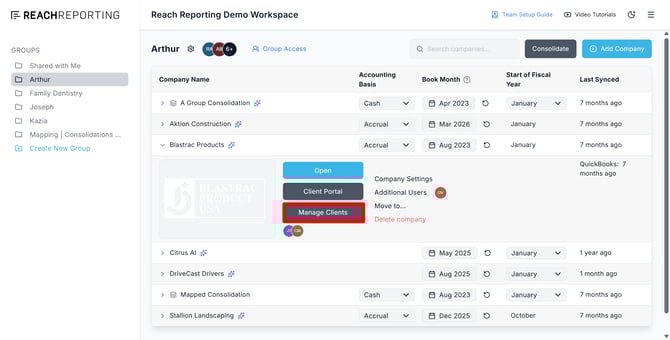
Select "Manage Clients" from the Workspace to add clients to your company.
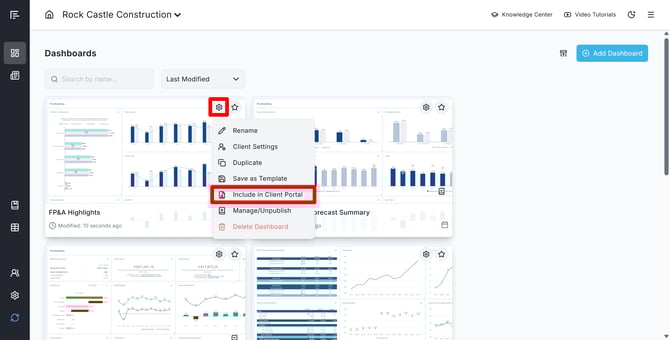
To enable reports/dashboards to be visible, select the gear icon on any preview and then choose "Include in Client Portal."
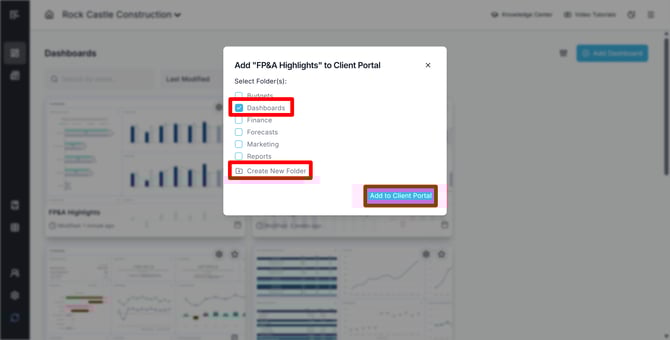
Select a Folder to add the report/dashboard to, or create a New Folder.
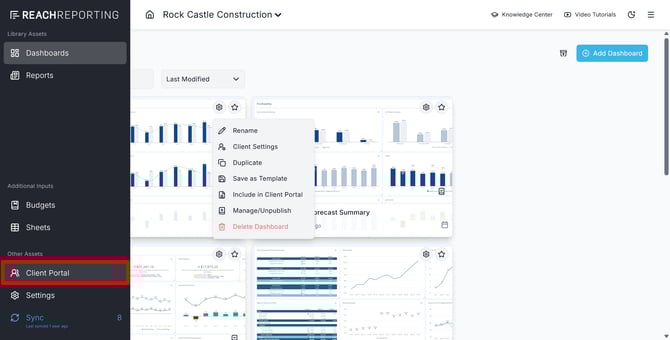
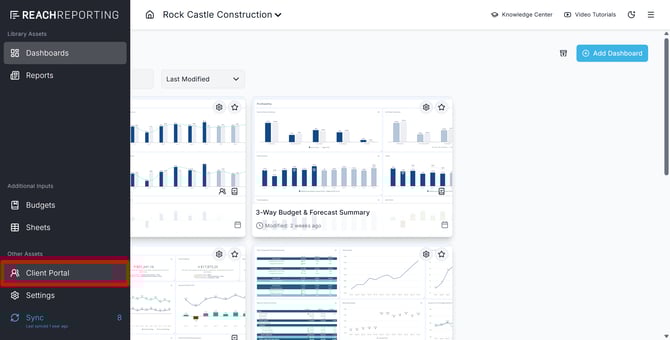
To see a preview of the client portal, navigate to the company navigation bar and choose "Client Portal".
What Your Clients Will See
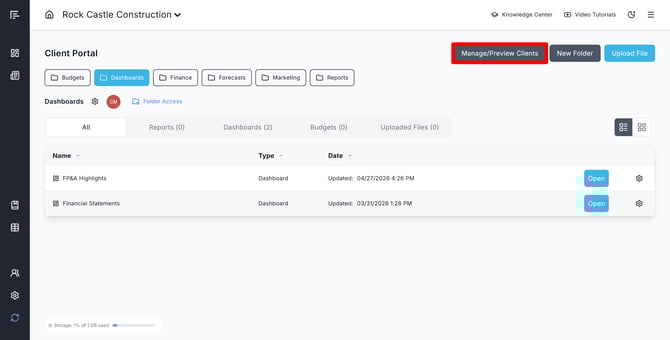
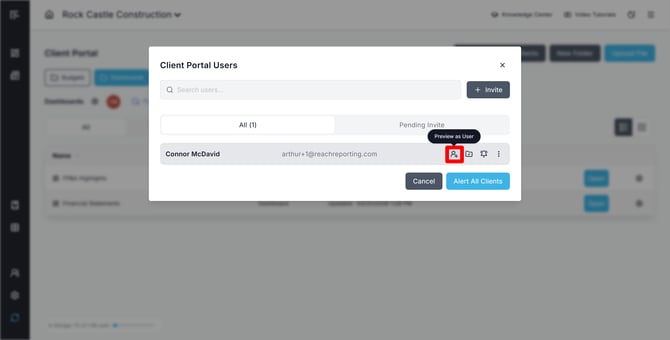
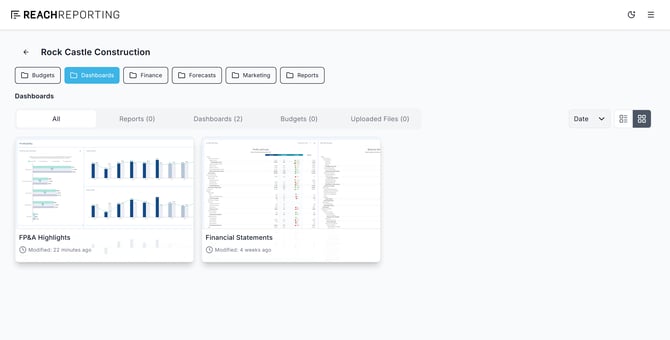
The folders and items you have shared with the client will determine what they see here. You can click Manage/Preview Clients in the Client Portal to preview as a client user.
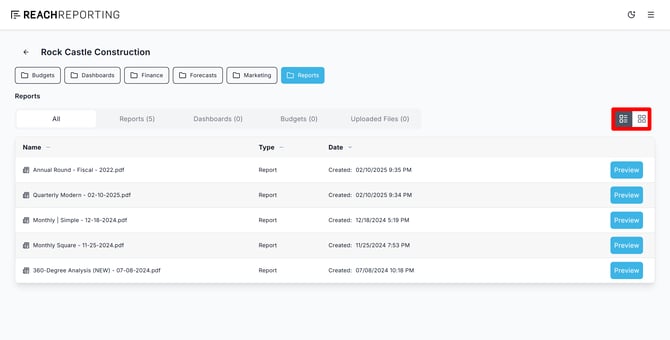
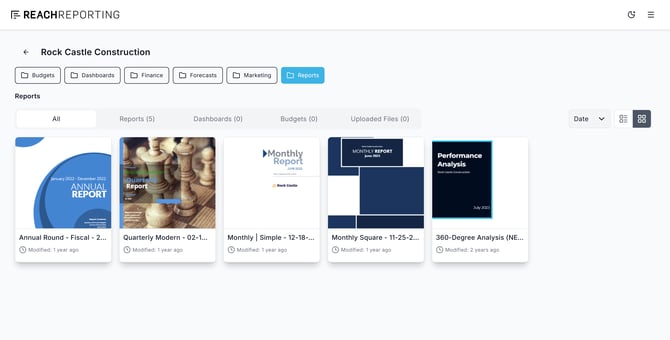
They can toggle between List or Grid view:
They can then download any report or open up a dashboard:
Setting Client Alerts
The Client Portal includes a powerful alert system that allows you to quickly notify your clients about changes, new reports, or important updates. This feature ensures that your clients are always up to date with the latest information in their portal.
To set up client alerts:
Step 1: Enter the Client Portal
Navigate to the client portal for the company you want to send alerts from.
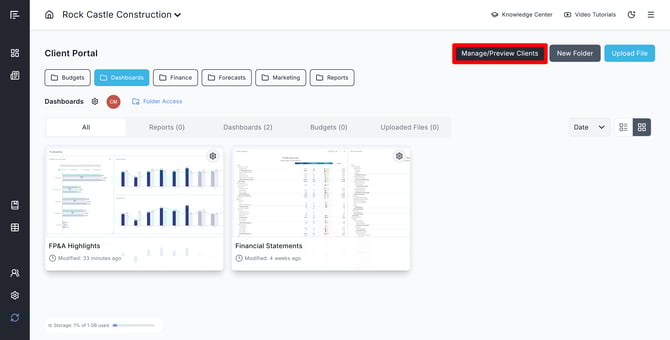
Step 2: Access Client Management
In the upper right corner of the screen, click on the "Manage/Preview Clients" button. This will open a modal window where you can manage your client alerts.
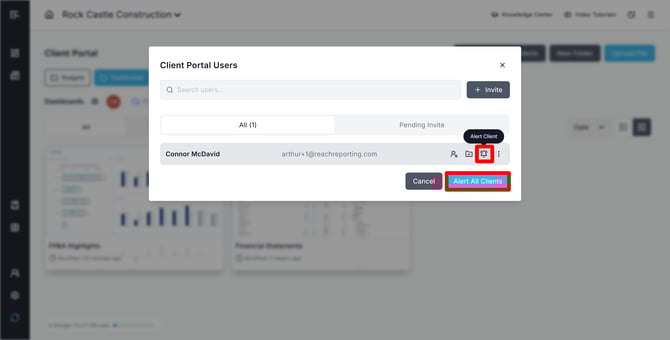
Step 3: Select Recipients
You have the flexibility to alert individual clients or all clients at once:
- Alert All Clients: Broadcast a message to everyone in your client list
- Alert Individual Clients: Select specific clients for targeted communications
Step 4: Compose Your Message
Add a short, informative message that will be sent to your selected clients. There is also an option to enable a copy of the message to be sent to yourself for record-keeping purposes.
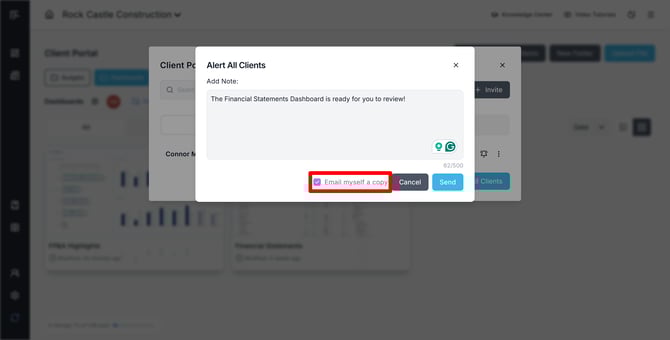
Step 5: Send the Alert
Click the "Send" button to deliver your alert to the chosen clients.
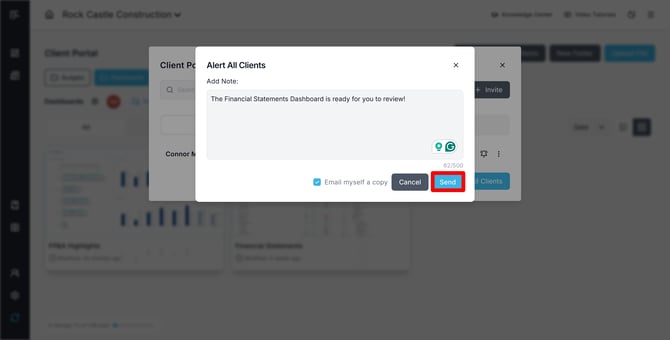
This alert system significantly enhances client communication by ensuring they are always aware of important updates in the client portal, making your client relationships more proactive and informed.
Budgets and Forecasts in the Client Portal
The Client Portal serves as an excellent platform for collaborative planning with your clients and team members. By including budgets and forecasts along with other shared business insights, you can keep everyone informed for better decision-making.
Check out our Knowledge Center article on Budgets and Forecasts in the Client Portal for more information.
White-labeled Client Portal
If you are interested in a white-labeled Client Portal, contact us by clicking on the chat bubble in the lower right in Reach. This is a premium feature and is an additional cost.
Go to the Reach Reporting app>
ARE YOU NOT CURRENTLY USING REACH REPORTING?
learn more at reachreporting.com
We are dedicated to helping you.
- Need Additional Help?
Your success is important to us.
Whether you're working as a CFO of a business or part of an accounting firm, Reach Reporting is here to improve your working knowledge of reporting and provide service tips and skills to ensure you're at the top of your game.
We make sure that you have access to staff members who are best suited to help you. We work together to resolve issues and create memorable moments that empower you to enhance your reporting skills.
We are here to listen to you. We understand that using new technology can be frustrating, so we can answer questions or jump on a quick Zoom call. Our entire staff has an in-depth knowledge of Reach Reporting and can quickly direct you to best practices to improve your reporting.
We are focused on providing solutions that save you time and increase your value. We continue to improve each day and look forward to visiting with you. Your communication with us is vital and appreciated.
Please feel free to chat with us by clicking the help chat bubble in the lower right-hand corner of this page.
Reach out to your Reach Reporting Rep and schedule a Zoom meeting by clicking the meeting link in their email signature.
Or schedule to join our ongoing webinars.
Reach Reporting is dedicated to helping provide a knowledge base that is easy to understand and informative. If you still have questions that have not been answered, please let us know by emailing support@reachreporting.com, chatting with our support team, or calling us at (877) 467-7637. We are here to ensure that you have a positive experience with Reach Reporting, as we want to continue to be the reporting solution you trust.
Need more access to Reach Reporting Resources?
Reach Reporting has a wealth of knowledge and a robust online community to support you as you create reports that provide powerful insight. Please look into the following resources.
Reach Reporting Blog: We add blogs to our site every month to give you great information in a fun and friendly manner.
Case Studies: We interview one company per month to help our clients highlight how they are using Reach Reporting and how it is improving their services and firm offerings. These case studies are invaluable to our community.
Knowledge Center: From simple to complicated, we provide step-by-step guidance to utilize every aspect of Reach Reporting in our robust knowledge center.
Video Tutorials: We know watching is sometimes easier than reading, which is why all of our tutorials are video-based in the video tutorial section of Reach Reporting and Youtube.
Social Networks: Join us on FaceBook, LinkedIn, Youtube, and Twitter.
Monthly Newsletter: Go to the footer of reachreporting.com and sign up to receive the Reach Reporting newsletters delivered directly to your inbox. Our newsletters cover tips and tricks, current events in accounting, strategies to improve your advisory services, and much more.
We look forward to helping you build insightful reports,
The Reach Reporting Team.