![Asset 1.png]](https://knowledge.reachreporting.com/hs-fs/hubfs/Asset%201.png?height=22&name=Asset%201.png)
In this article:
- What Is Three-Way Planning?
- Why Three-Way Planning Matters
- How the Three-Way Integration Works
- How the Ending Cash Balance Is Calculated
- Planning Across All Three Statements
What Is Three-Way Planning?
Three-way planning integrates three key financial statements into a unified planning framework:
- Profit & Loss (P&L) — provides insight into operational performance by projecting revenue, expenses, and net income over a specific period
- Balance Sheet — a point-in-time snapshot of long-term financial health, projecting assets, liabilities, and equity
- Cash Flow Statement — tracks the details of a company's liquidity, projecting cash inflows and outflows, and the ending cash position each month
Most traditional budgeting tools only plan for the P&L. The limitation of that approach is that P&L profit does not equal cash in the bank. A business can be profitable on paper while running out of cash due to timing differences in collections, payments, debt service, or capital spending. Three-way planning solves this by connecting all three statements so you always have a complete, consistent picture of your financial position.
Why Three-Way Planning Matters
When your P&L, Balance Sheet, and Cash Flow are all connected, a change in one assumption flows through the entire plan automatically, without the need for separate spreadsheets or manual reconciliation. Three-way planning helps you:
- Forecast future cash flow based on your revenue and expense projections
- Plan for funding needs before a cash shortfall occurs
- Evaluate growth or cost-saving strategies and immediately see their effect on liquidity and financial position
A few concrete examples of what this makes possible:
- Add a new loan on the Balance Sheet and immediately see the cash inflow under financing activities and the effect on your ending cash balance.
- Increase projected revenue and immediately see the impact on Accounts Receivable, the timing of cash collections, and your month-end cash position.
- Plan a large asset purchase and immediately see it reflected as a cash outflow under investing activities.
- Model payroll increases or new hires and see the full downstream effect on net income and cash.
Reach Reporting automates all of this without requiring complicated formulas.
How the Three-Way Integration Works
Step 1: Plan the Profit & Loss
The P&L is where planning begins. You project revenues and costs over a specific period. For example, if your business plans to make $1,000,000 in sales next year with a net profit of $50,000 per month, that net income flows to the Balance Sheet as part of equity. This will show up under current year earnings or net income as a monthly increase of $50,000, reflecting your cumulative net income or profit.
Monthly sales and expenses also affect your Accounts Receivable and Accounts Payable positions on the Balance Sheet. For example, if you have 30-day payment terms for invoiced sales, the $100,000 budgeted in sales for January will show up in Accounts Receivable. After 30 days, once payments are received, they clear out and only the new month's sales remain in the balance. See Planning for Accounts Receivable, Accounts Payable, and Inventory Turnover for more information.
Step 2: Plan the Balance Sheet
The main challenge in projecting the Balance Sheet is ensuring that changes in assets and liabilities remain consistent with P&L assumptions and that the accounting equation (assets = liabilities + equity) always holds. Reach Reporting handles this automatically by routing all budget adjustments through your chosen bank account as the balancing account.
For example:
- If your business takes on $100,000 in new debt, this appears as an increase in liabilities on the Balance Sheet, with a corresponding increase in the bank account balance.
- If you purchase a new asset for $70,000, this appears as an increase in assets with a corresponding decrease in the bank account balance.
Step 3: The Cash Flow Statement Calculates Automatically
The Cash Flow Statement is fully automated. It takes your budgeted net profit or loss as its starting point, then adjusts for:
- Changes in working capital, including delayed cash timing for Accounts Receivable and Accounts Payable
- Changes in fixed assets and long-term debt, such as asset purchases and loan proceeds
Continuing the examples above: the $100,000 loan recorded as an increase in liabilities on the Balance Sheet appears as a cash inflow under financing activities, increasing the ending cash balance. The $70,000 asset purchase appears as a cash outflow under investing activities, reducing the projected cash balance.
Because the Cash Flow Statement is driven entirely by changes in the P&L and Balance Sheet, it is locked to prevent accidental edits. Your ending cash balance recalculates automatically every time you update an assumption anywhere in the plan. Reach Reporting uses the indirect method for calculating cash flow.
How the Ending Cash Balance Is Calculated
The ending cash balance equals the bank account balance budgeted on the Balance Sheet and any undeposited funds if applicable. More specifically:
- In a budget: The ending cash balance begins from a starting balance derived from your prefill period, then adds or subtracts projected cash flows from operating, investing, and financing activities each month.
- In a forecast: The ending cash balance for closed periods is sourced from actual bank account balances on the Balance Sheet. From the forecast month forward, it projects based on forecasted P&L and Balance Sheet changes.
Planning Across All Three Statements
Profit & Loss
The P&L is where most budgeting begins. Reach Reporting gives you several ways to build and automate your projections:
- Row drivers — automate projections based on historical data using options like Based on Previous Year, Trailing Average, Linear Forecast, Period Over Period Growth Rate, and Annual Target. See Row Drivers in Budgets/Forecasts for a full breakdown.
- Manual entry and formulas — enter values directly or write spreadsheet-style formulas, just as you would in Excel.
- Data Sheet — build complex supporting calculations (payroll models, depreciation schedules, loan amortization) and link them back to P&L rows. Connect a Google Sheet or Excel file for collaborative planning inputs. See Budget/Forecast Data Sheets.
Balance Sheet
The Balance Sheet lets you plan for assets, liabilities, and equity alongside your P&L:
- All accounts default to the Carry Forward driver, which automatically carries the prior month's balance forward.
- You can manually enter one-time items like asset purchases, new loans, or loan repayments for any month.
- AR, AP, and Inventory automation can be configured in the budget settings so that payment and collection timing flows correctly to the Cash Flow Statement — no formulas needed.
- Retained Earnings can be overridden to account for distributions, dividends, restructuring, or other adjustments.
See Planning for Accounts Receivable, Accounts Payable, and Inventory Turnover for setup details.
Cash Flow Statement
The Cash Flow Statement is fully automated and requires no direct input. Reach Reporting uses the indirect method for calculating cash flow.
The Cash Flow Statement calculates operating, investing, and financing activities based on changes in your P&L and Balance Sheet, and produces a monthly ending cash balance that updates in real time as you adjust your plan. Reach Reporting looks at the balance of each Balance Sheet account in one month and compares it to the balance in the next month. The difference is what drives the corresponding Cash Flow entry. Cash coming in increases the ending cash balance; cash going out reduces it.
For example, imagine a loan balance on the Balance Sheet:
|
Jan |
Feb |
Mar |
|
|
Long-Term Loan |
$0 |
$100,000 |
$95,000 |
|
Cash Flow Effect |
— |
+$100,000 (loan received) |
−$5,000 (repayment) |
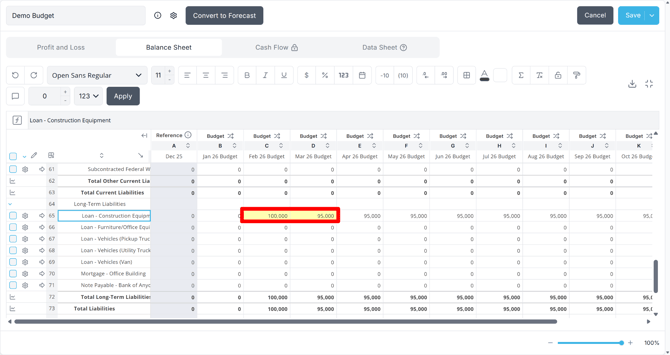
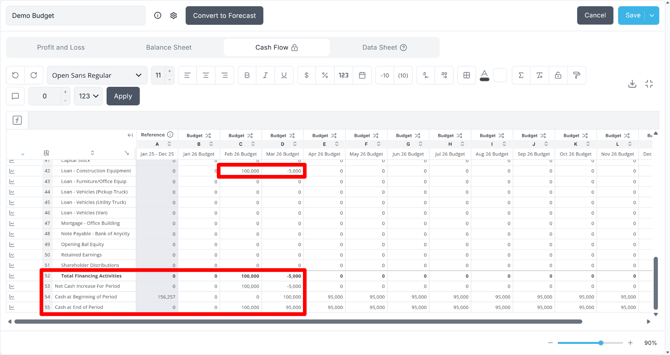
The $100,000 increase from January to February appears as a cash inflow under financing activities in February. The $5,000 decrease from February to March appears as a cash outflow in March. Reach Reporting detects the change and calculates the cash impact automatically.
The same logic applies across all Balance Sheet accounts: changes in Accounts Receivable, Accounts Payable, Inventory, fixed assets, and any other account all flow through to the Cash Flow Statement based on their month-over-month movement.
Scenario Planning
Because budgets and forecasts can be duplicated, Reach Reporting makes it straightforward to model multiple scenarios side by side. You might maintain:
- A base case budget reflecting your most likely assumptions
- An upside scenario with higher revenue growth or improved margins
- A downside scenario modeling the effect of a lost client, rising costs, or an economic slowdown
Each version is a separate budget in the Budgets/Forecasts tab. You can switch between them in column settings within any metric or statement, or set a different one as the default to update all your templates at once.
The Data Sheet is particularly useful for scenario planning — you can build out variable assumptions (such as headcount, pricing, or churn rate) in a connected spreadsheet and see the effect on the P&L, Balance Sheet, and cash position immediately. See Data Sheets and Budget/Forecast Data Sheets for more information.
Using Your Plan in Reports and Dashboards
Once your budget or forecast is complete and set as the default, it flows automatically into Reach Reporting's template reports and dashboards. You can:
- Compare budget vs. actuals side by side in any metric or statement using the Budget/Forecast column type
- Use templates pre-built for budget vs. actual analysis that populate with your data immediately
- Share the budget or forecast with clients through the Client Portal with view-only or edit access
- Display variance amounts and percentages using custom columns and formulas in any metric
All templates are fully customizable to match your exact reporting needs.
Where to Go Next
Now that you understand how three-way planning works, use these articles to build and maintain your plan:
- How to Create a Budget — step-by-step guide to building a budget in Reach Reporting
- How to Create a Forecast — how to convert a budget to a rolling forecast and maintain it monthly
- Row Drivers in Budgets/Forecasts — full guide to all available automation drivers
- Budget/Forecast Data Sheets — connecting custom calculations and external data to your plan
- Planning for Accounts Receivable, Accounts Payable, and Inventory Turnover — configuring AR, AP, and Inventory automation
- Budgeting with Reference Data — how reference data works and how to refresh drivers
- Multi-Year Budget Creation Guide — building plans that span multiple fiscal years
- Budgets and Forecasts in the Client Portal — sharing plans with clients
Go to the Reach Reporting app>
ARE YOU NOT CURRENTLY USING REACH REPORTING?
learn more at reachreporting.com
We are dedicated to helping you.
- Need Additional Help?
Your success is important to us.
Whether you're working as a CFO of a business or part of an accounting firm, Reach Reporting is here to improve your working knowledge of reporting and provide service tips and skills to ensure you're at the top of your game.
We make sure that you have access to staff members who are best suited to help you. We work together to resolve issues and create memorable moments that empower you to enhance your reporting skills.
We are here to listen to you. We understand that using new technology can be frustrating, so we can answer questions or jump on a quick Zoom call. Our entire staff has an in-depth knowledge of Reach Reporting and can quickly direct you to best practices to improve your reporting.
We are focused on providing solutions that save you time and increase your value. We continue to improve each day and look forward to visiting with you. Your communication with us is vital and appreciated.
Please feel free to chat with us by clicking the help chat bubble in the lower right-hand corner of this page.
Reach out to your Reach Reporting Rep and schedule a Zoom meeting by clicking the meeting link in their email signature.
Or schedule to join our ongoing webinars.
Reach Reporting is dedicated to helping provide a knowledge base that is easy to understand and informative. If you still have questions that have not been answered, please let us know by emailing support@reachreporting.com, chatting with our support team, or calling us at (877) 467-7637. We are here to ensure that you have a positive experience with Reach Reporting, as we want to continue to be the reporting solution you trust.
Need more access to Reach Reporting Resources?
Reach Reporting has a wealth of knowledge and a robust online community to support you as you create reports that provide powerful insight. Please look into the following resources.
Reach Reporting Blog: We add blogs to our site every month to give you great information in a fun and friendly manner.
Case Studies: We interview one company per month to help our clients highlight how they are using Reach Reporting and how it is improving their services and firm offerings. These case studies are invaluable to our community.
Knowledge Center: From simple to complicated, we provide step-by-step guidance to utilize every aspect of Reach Reporting in our robust knowledge center.
Video Tutorials: We know watching is sometimes easier than reading, which is why all of our tutorials are video-based in the video tutorial section of Reach Reporting and Youtube.
Social Networks: Join us on FaceBook, LinkedIn, Youtube, and Twitter.
Monthly Newsletter: Go to the footer of reachreporting.com and sign up to receive the Reach Reporting newsletters delivered directly to your inbox. Our newsletters cover tips and tricks, current events in accounting, strategies to improve your advisory services, and much more.
We look forward to helping you build insightful reports,
The Reach Reporting Team.