![Asset 1.png]](https://knowledge.reachreporting.com/hs-fs/hubfs/Asset%201.png?height=22&name=Asset%201.png)
In this article:
- Overview
- Benchmarking Methods Available in Reach Reporting
- Best Practices for Benchmarking
- Frequently Asked Questions
Overview
Benchmarking is a powerful tool for comparing financial performance against industry standards, peers, or internal goals. Reach Reporting offers several flexible approaches to benchmarking that allow you to create meaningful comparisons tailored to your specific needs.
Note: Reach Reporting does not provide built-in industry benchmarking data
Benchmarking Methods Available in Reach Reporting
1. Benchmark Against Your Own Clients Using Consolidations
One of the most effective ways to benchmark is by comparing similar clients within your practice. Using Reach Reporting's consolidations feature, you can:
- Create a consolidation with all clients you want to benchmark together
- Use the mapping tool to create groups in the chart of accounts that you want to compare
- Add calculated columns to highlight comparisons. Use formulas to generate whatever comparative metrics you want: averages, medians, percentages, ratios, spreads between highest/lowest performers, anything that helps surface insights.
- Build a firm-level dashboard that displays KPIs for multiple clients, allowing firm owners to track performance across their client base at a glance
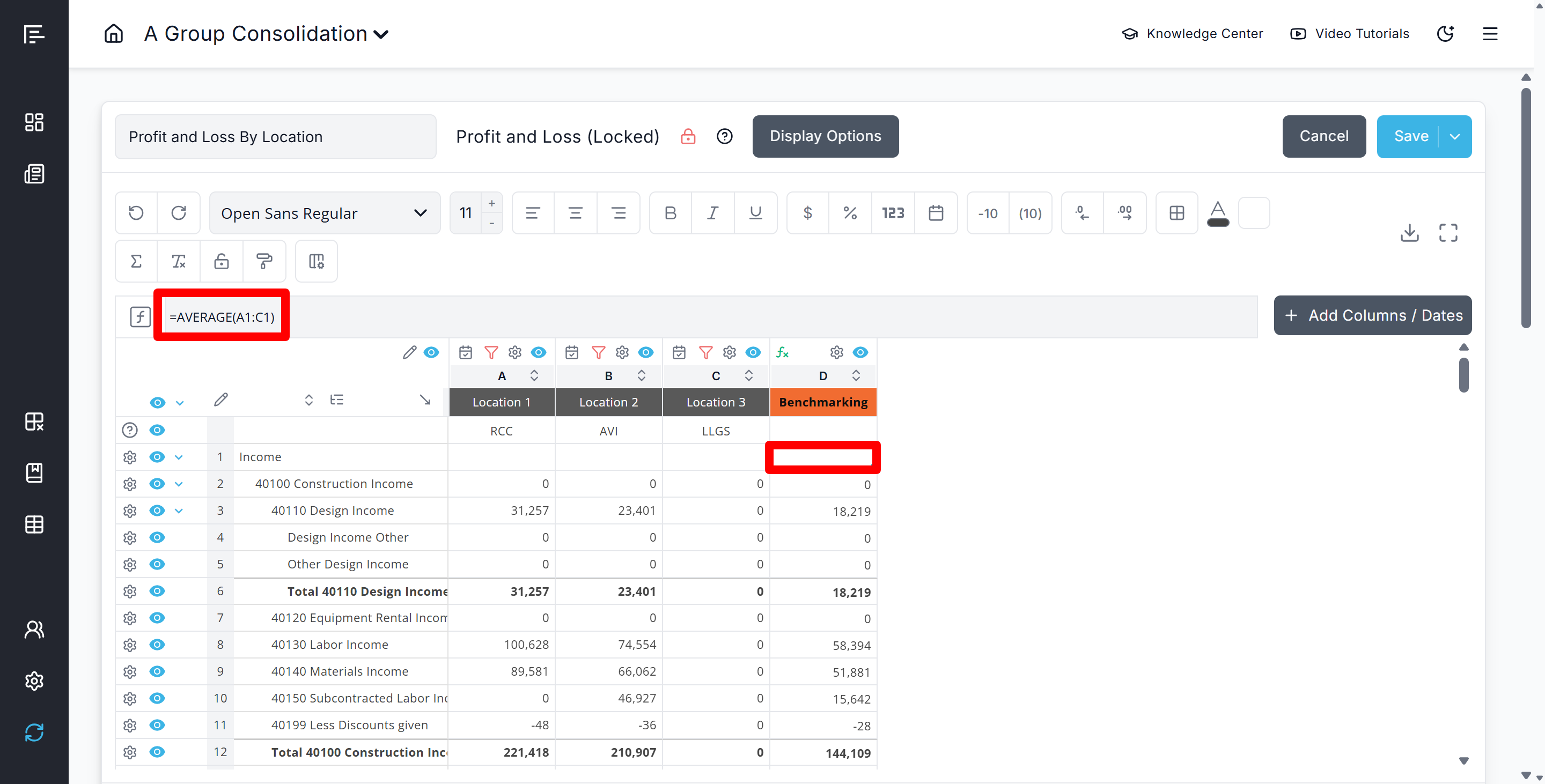
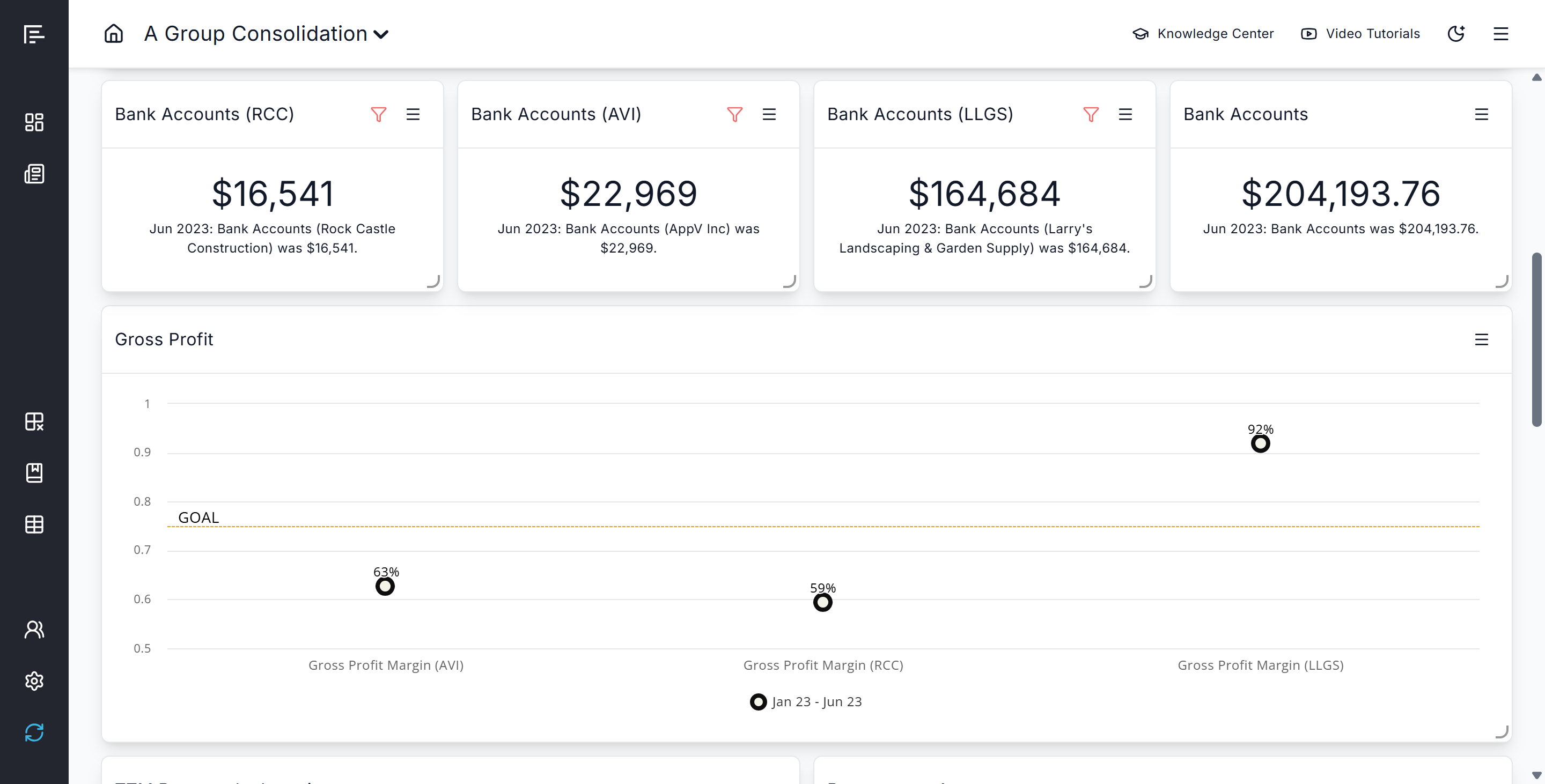
This method is particularly useful for accounting firms that work with similar businesses in the same industry.
Example Use Case:
A CPA firm working with multiple dental practices can consolidate all dental practice clients, map key revenue and expense categories consistently, and create average benchmarks to show each individual practice how they compare to their peers.
2. Import Industry Data via Google Sheets or Excel
While Reach Reporting does not provide built-in industry benchmarking data, you can easily bring in your own:
- Source industry benchmark data from research reports, industry associations, or third-party providers
- Format the data in a Google Sheet or Excel following Reach's template requirements
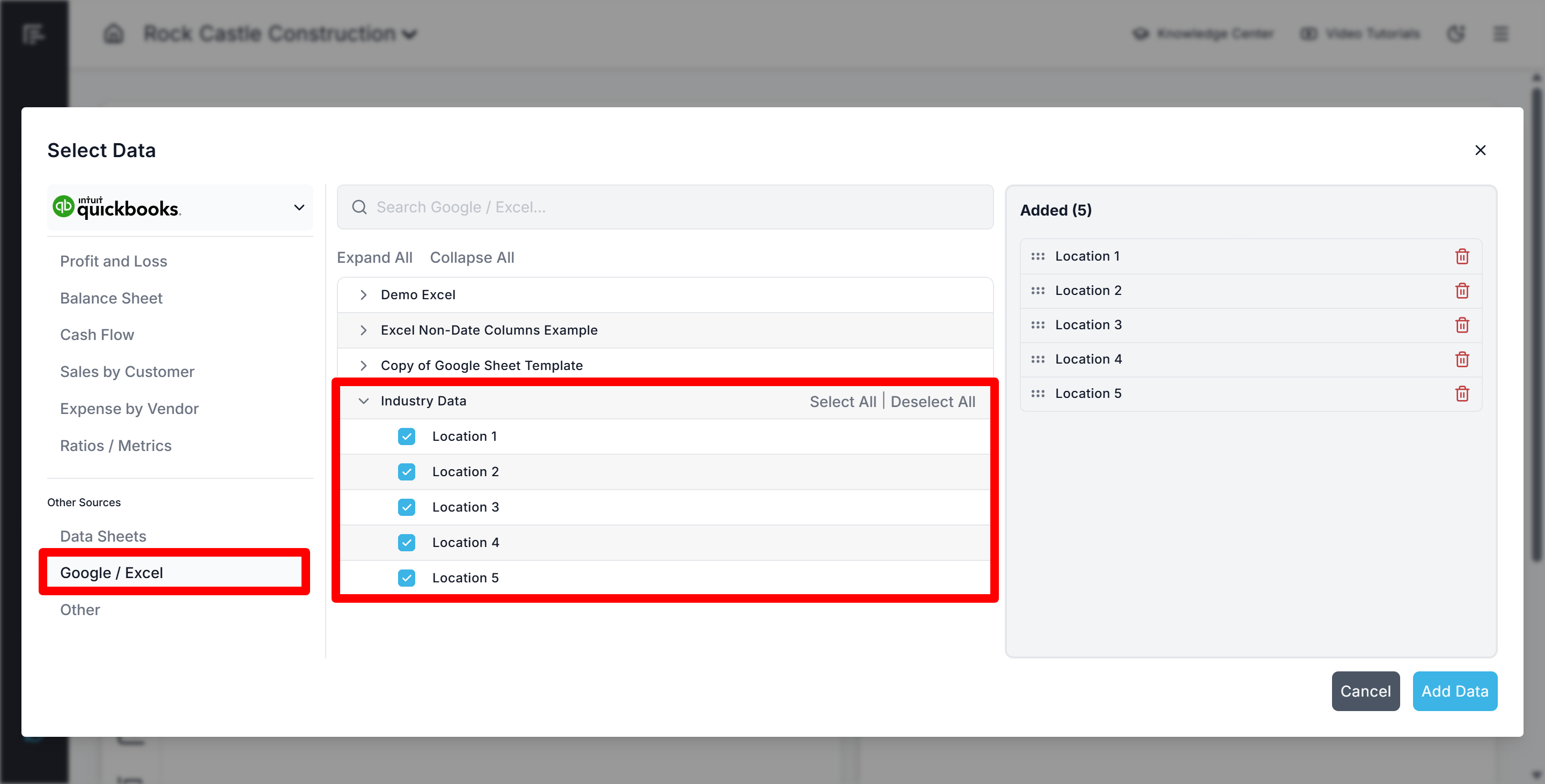
- Connect the Google Sheet or Excel to Reach Reporting through the Sheets integration
- Pull the benchmark data into your metrics and statements using the data picker
This approach gives you complete control over the benchmark data sources you use and allows you to customize the comparisons to match your specific needs.
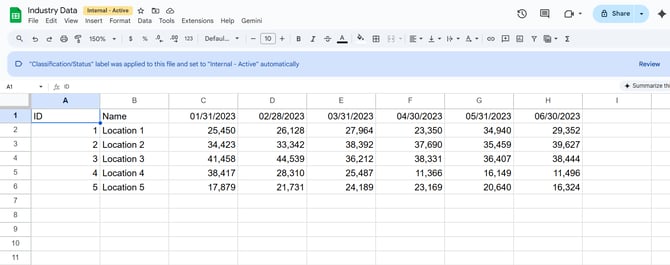
In this example, income from 5 different locations in the same industry is being brought into Reach through a Google Sheet import:
Next, you can build a custom metric that pulls income from your practice, as well as the income from the Google Sheets data through the data picker:
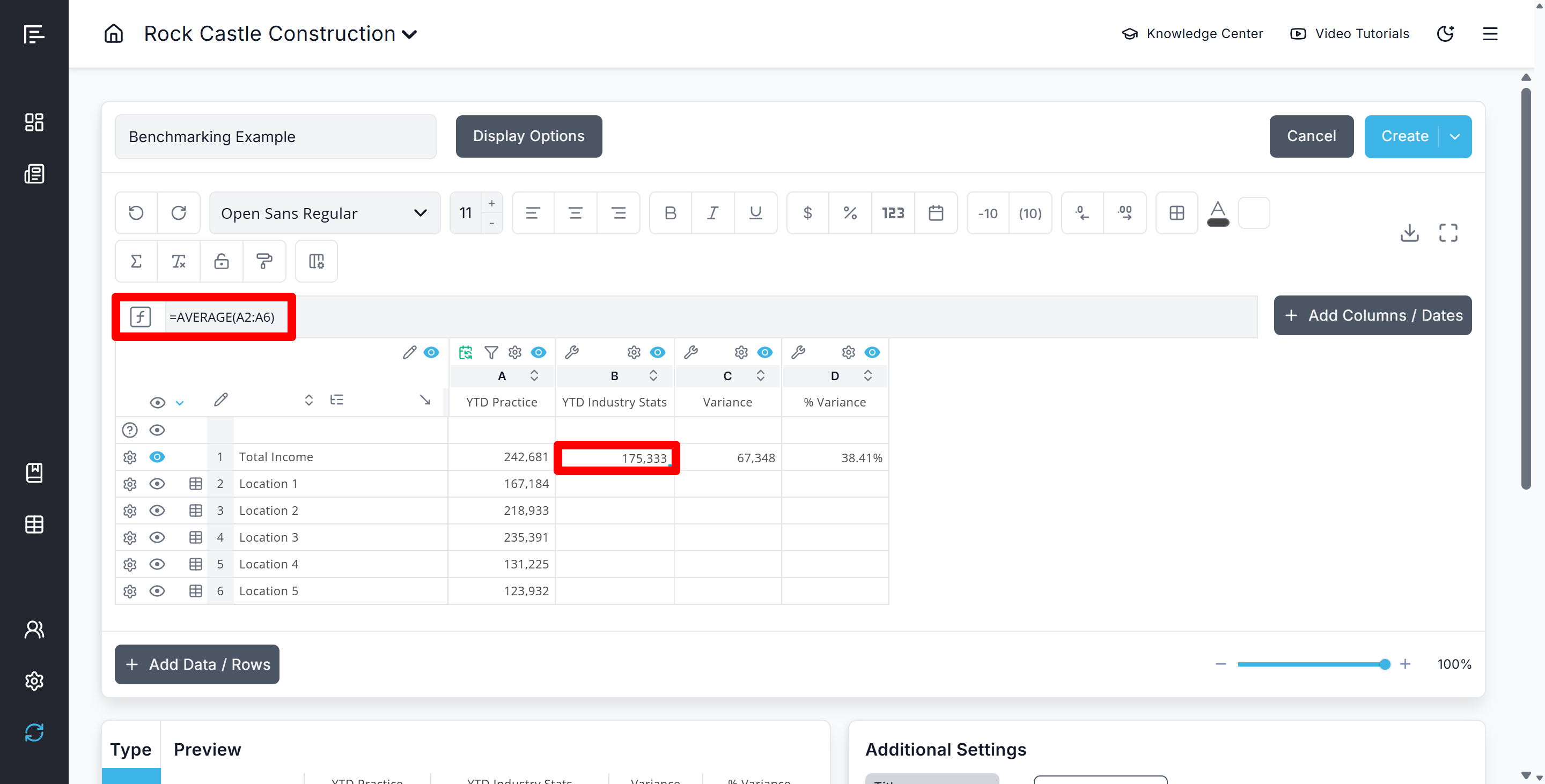
You can then hide the location rows, add in a custom column to show the average of all locations from your industry data, and add in additional columns to compare between your practice and the industry average:
3. Set Goal Lines or Ranges on KPIs
For benchmarks based on your professional experience or client-specific targets:
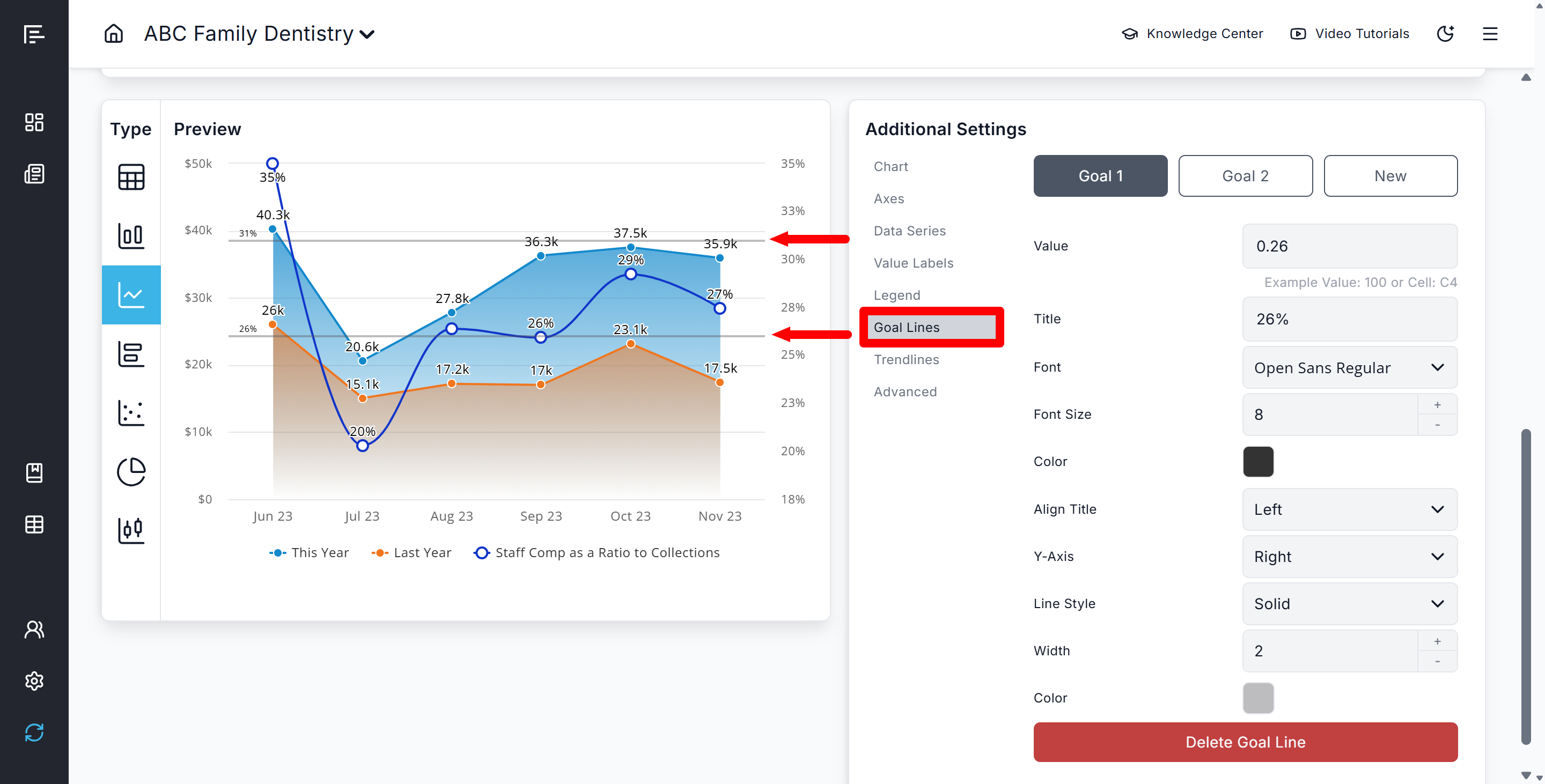
- Add goal lines to charts in the metric builder's additional settings
- Set target ranges that represent acceptable performance levels
- Customize visual indicators to show when metrics fall above or below goals
4. Create Benchmarks Using Budgets Pro
Use Reach Reporting's Budgets Pro feature to load your benchmarks for deeper analysis:
- Instead of entering budget numbers, enter benchmark numbers directly into a budget in Budgets Pro or in an Excel budget template
- Use actuals vs. budget templates to compare performance actuals against benchmarks
- Analyze variances to identify areas where performance differs from expectations
This approach is ideal for goal-setting and performance tracking.
5. Use Conditional Formatting for Visual Benchmarking
Make benchmark comparisons immediately visible using conditional formatting:
- Apply conditional formatting rules to highlight positive or negative variances from benchmark amounts
- Use color coding (green for favorable, red for unfavorable) to make performance gaps obvious at a glance
- Customize the Financial Health KPIs metric on the Key Numbers page from the Monthly Advanced Analysis template by adjusting benchmark amounts to suit your needs
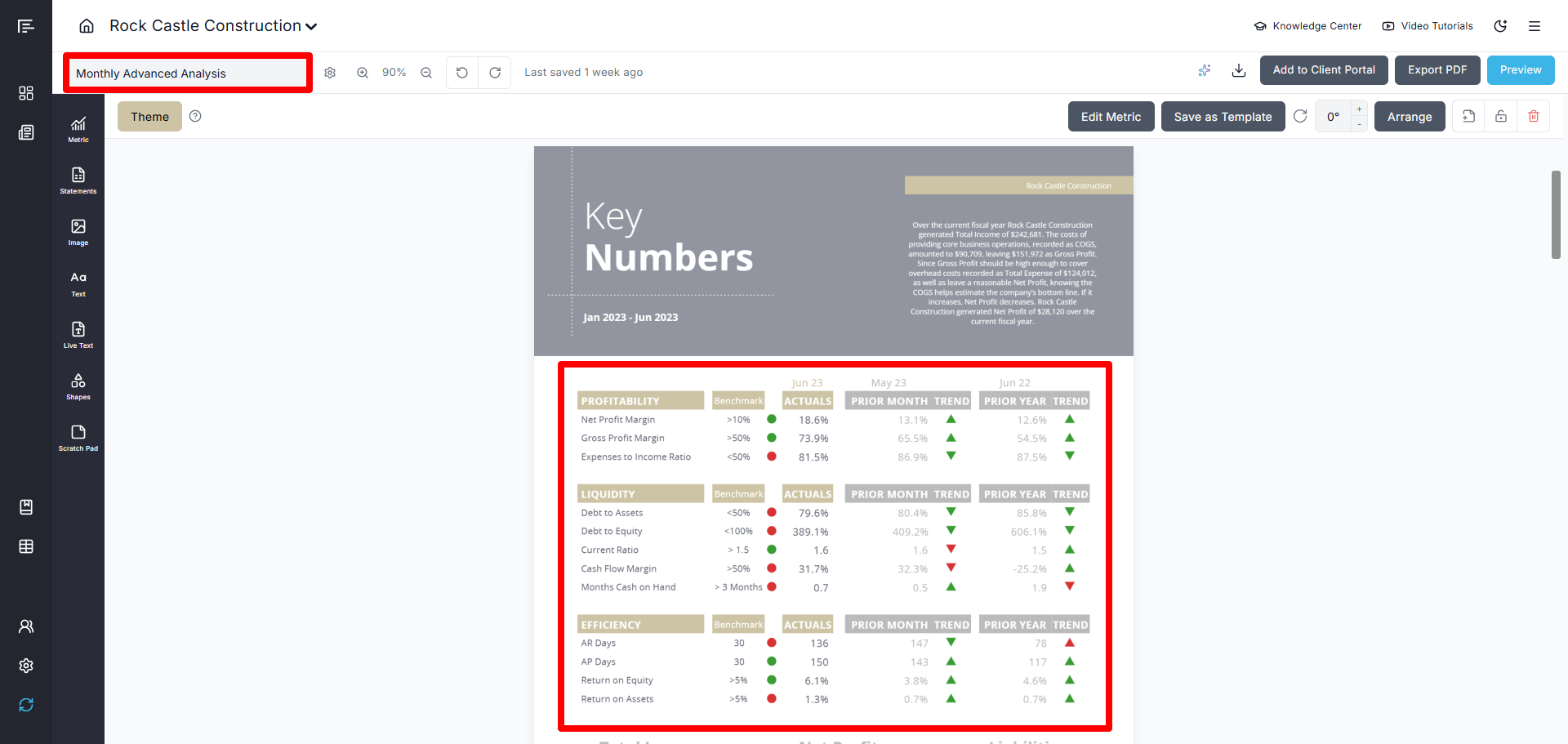
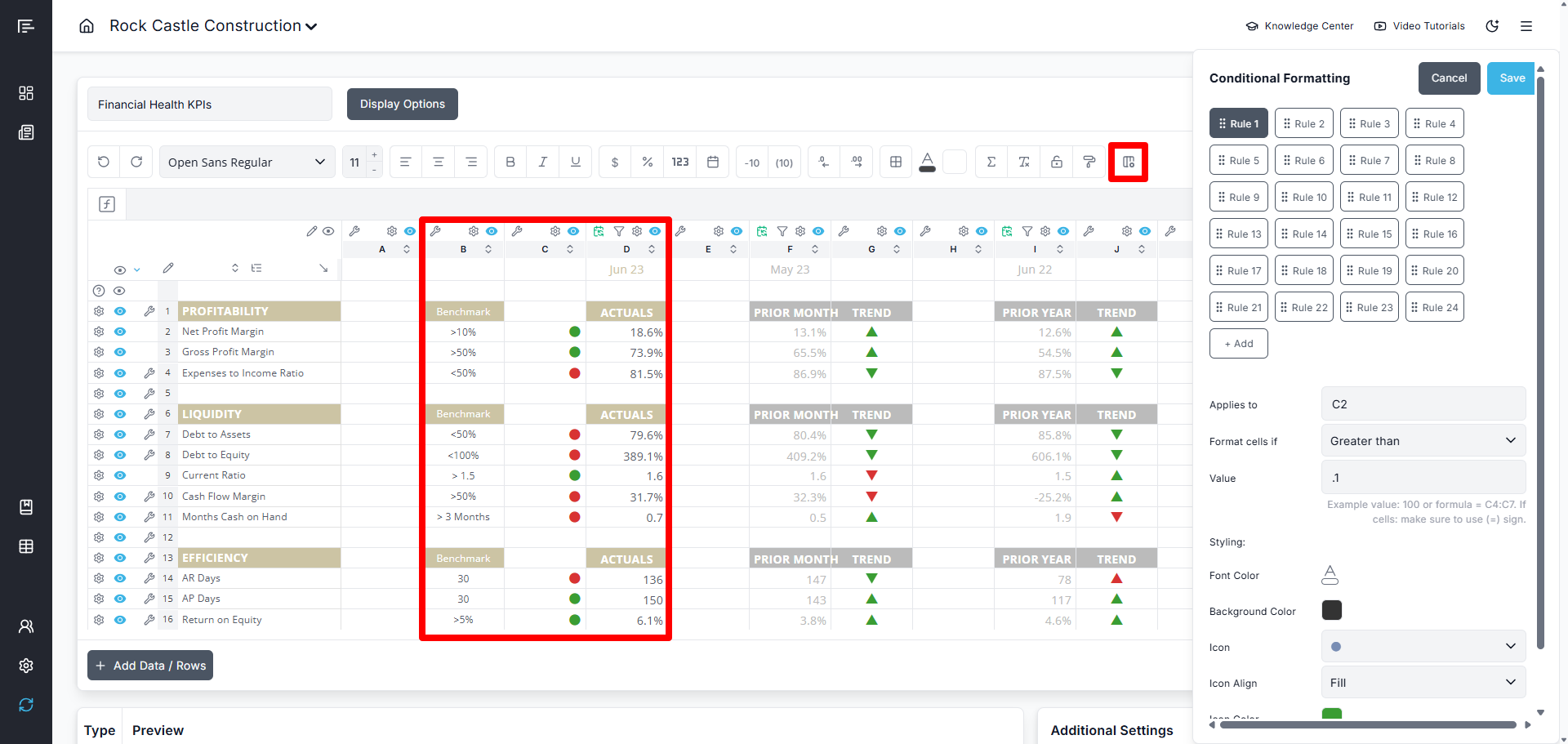
This visual approach helps stakeholders quickly identify areas requiring attention.
Best Practices for Benchmarking
- Ensure Consistent Chart of Accounts Mapping: When benchmarking multiple companies, use the mapping tool to ensure accounts are grouped consistently across all entities.
- Choose Relevant Comparisons: Select benchmark sources and peer groups that are truly comparable to the business being analyzed (similar size, location, business model, etc.).
- Update Regularly: Keep your benchmark data current by syncing Google Sheets regularly or updating consolidated client data.
- Provide Context: Always explain what the benchmarks represent and why they're relevant when presenting comparative analysis to clients.
- Combine Methods: Use multiple benchmarking approaches together for a more comprehensive view (e.g., compare against both peer averages and internal goals).
Frequently Asked Questions
Q: Does Reach Reporting provide industry benchmark data?
A: No, Reach Reporting does not provide industry benchmarking data. However, you can easily import your own industry data using Google Sheets integration.
Q: Can I benchmark a single client against multiple peer groups?
A: Yes, you can create multiple consolidations representing different peer groups and compare an individual client's performance against each one.
Q: How often should I update benchmark data?
A: This depends on your data source and needs. For consolidation-based benchmarks, sync whenever you want current peer comparisons. For industry data via Google Sheets, update as frequently as new industry data becomes available.
Q: Can I use benchmarking in the client portal?
A: Yes, you can include benchmark comparisons in dashboards and reports that are shared via the client portal, allowing clients to see how their performance compares.
Go to the Reach Reporting app>
ARE YOU NOT CURRENTLY USING REACH REPORTING?
learn more at reachreporting.com
We are dedicated to helping you.
- Need Additional Help?
Your success is important to us.
Whether you're working as a CFO of a business or part of an accounting firm, Reach Reporting is here to improve your working knowledge of reporting and provide service tips and skills to ensure you're at the top of your game.
We make sure that you have access to staff members who are best suited to help you. We work together to resolve issues and create memorable moments that empower you to enhance your reporting skills.
We are here to listen to you. We understand that using new technology can be frustrating, so we can answer questions or jump on a quick Zoom call. Our entire staff has an in-depth knowledge of Reach Reporting and can quickly direct you to best practices to improve your reporting.
We are focused on providing solutions that save you time and increase your value. We continue to improve each day and look forward to visiting with you. Your communication with us is vital and appreciated.
Please feel free to chat with us by clicking the help chat bubble in the lower right-hand corner of this page.
Reach out to your Reach Reporting Rep and schedule a Zoom meeting by clicking the meeting link in their email signature.
Or schedule to join our ongoing webinars.
Reach Reporting is dedicated to helping provide a knowledge base that is easy to understand and informative. If you still have questions that have not been answered, please let us know by emailing support@reachreporting.com, chatting with our support team, or calling us at (877) 467-7637. We are here to ensure that you have a positive experience with Reach Reporting, as we want to continue to be the reporting solution you trust.
Need more access to Reach Reporting Resources?
Reach Reporting has a wealth of knowledge and a robust online community to support you as you create reports that provide powerful insight. Please look into the following resources.
Reach Reporting Blog: We add blogs to our site every month to give you great information in a fun and friendly manner.
Case Studies: We interview one company per month to help our clients highlight how they are using Reach Reporting and how it is improving their services and firm offerings. These case studies are invaluable to our community.
Knowledge Center: From simple to complicated, we provide step-by-step guidance to utilize every aspect of Reach Reporting in our robust knowledge center.
Video Tutorials: We know watching is sometimes easier than reading, which is why all of our tutorials are video-based in the video tutorial section of Reach Reporting and Youtube.
Social Networks: Join us on FaceBook, LinkedIn, Youtube, and Twitter.
Monthly Newsletter: Go to the footer of reachreporting.com and sign up to receive the Reach Reporting newsletters delivered directly to your inbox. Our newsletters cover tips and tricks, current events in accounting, strategies to improve your advisory services, and much more.
We look forward to helping you build insightful reports,
The Reach Reporting Team.