![Asset 1.png]](https://knowledge.reachreporting.com/hs-fs/hubfs/Asset%201.png?height=22&name=Asset%201.png)
In this article:
- What doesn't your integration do?
- Can Reach pull over the chart of accounts structure from my Xero custom reports?
- How do I manage billing?
- When and how does data sync occur?
- Does Xero use 2FA?
- How do I hide inactive accounts?
- How can I map my Bank & Credit Card accounts?
- Can Reach pull in my budgets by department in Xero?
- My P&L in Reach is showing a Foreign Currency Gains and Losses account. What is this account?
- I am using the Account Mapping Tool, but do not see the ability to map my main Accounts Receivable and Accounts Payable accounts.
- How do I disconnect from Xero?
What doesn’t your integration do?
Reach Reporting connects to Xero to pull important financial information so that various statements, KPIs, Metrics, and Data can be used in creating truly custom reports and dashboards. Reach has the capability to include custom data and create calculations to build advanced reporting.
Reach simply pulls data and doesn't do any form of pushing data to Xero or any form of reconciliation.
Can Reach pull over the chart of accounts structure from my Xero custom reports?
Reach cannot pull in custom reports from Xero, but we have a Mapping Tool that can be used to structure the chart of accounts as needed.
How do I manage billing?
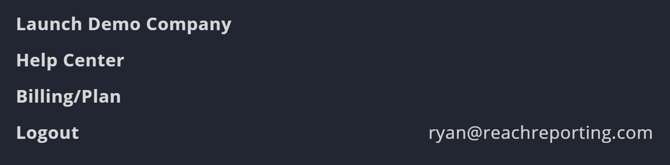
Easily manage your billing within the menu. Reach Reporting has a 30-day trial period and No Contract. Check out our Knowledge Center article on Managing Your Billing and Plan for more information.
When and how does data sync occur?
After the first time connecting, your company will automatically sync your data every 24 hours, or you can manually sync your company files at any time by clicking on the sync button in the lower-left when the company is open within Reach Reporting. This will sync the last 5 years.
Note: If a company has been synced in the last 18 hours, it will not automatically sync overnight
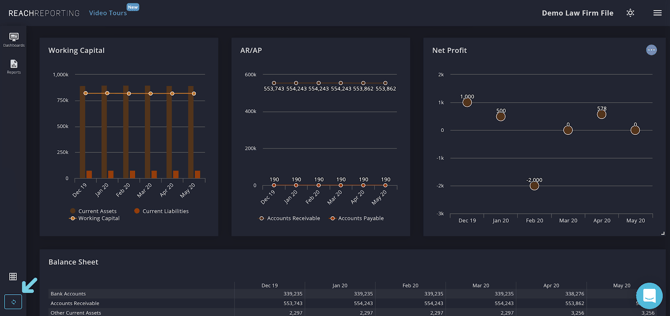
Check out our Knowledge Center article on Syncing Your Company for more information.
Does Xero use 2FA?
Due to regulations set by Xero, Reach enforces 2FA on any workspaces with Xero companies connected. Check out this Knowledge Center article for more information on Xero 2FA.
How do I hide inactive accounts?
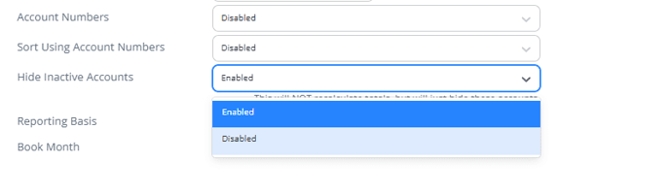
Xero users can hide inactive accounts by archiving them in the company settings, keeping your chart of accounts clean and easy to manage.
How can I map my Bank & Credit Card accounts?
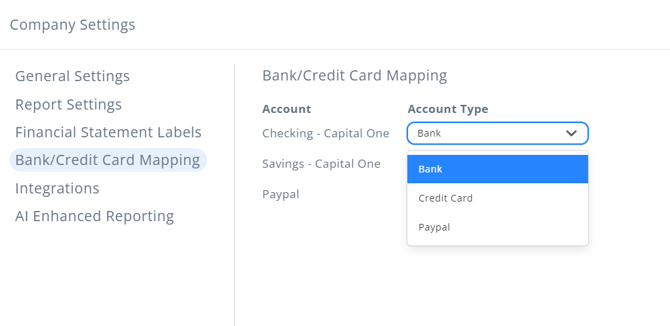
Xero sometimes treats credit cards as bank accounts. If a credit card has a balance, it may show up as cash in the reports.
Bank and credit cards can be mapped in the company settings for Xero companies. Mapping ensures that credit cards are classified correctly so your reports stay accurate.
Can Reach pull in my budgets by department in Xero?
Budgets by department in Xero can not be filtered, as they do not get consolidated inside of Reach. “Overall” budget is not the sum of classes/departments.
In order to see the different budgets, you can utilize the column settings rather than using the dynamic filters in the display settings or the filters above the columns. Alternatively, you could use our Budgets by Class using Budgets Pro.
My P&L in Reach is showing a Foreign Currency Gains and Losses account. What is this account?
This account is the combined amount of foreign currency accounts as the Xero integration combines 3 accounts into 1 in the Reach API:
- Gain/Loss FX (Realized)
- Gain/Loss FX (Unrealized)
- Bank Revaluations (FX)
This account has nothing to do with our Consolidations or Multi-Currency Conversion features.
I am using the Account Mapping Tool, but do not see the ability to map my main Accounts Receivable and Accounts Payable accounts.
Xero has locked Accounts Receivable and Accounts Payable accounts, so they are unavailable for mapping. These accounts will automatically show up in reports and budgets.
How do I disconnect from Xero?
If you feel that Reach isn't the right fit, disconnecting from Reach can be done inside Xero or within the Reach app with ease.

Go to the Reach Reporting app>
ARE YOU NOT CURRENTLY USING REACH REPORTING?
learn more at reachreporting.com
We are dedicated to helping you.
- Need Additional Help?
Your success is important to us.
Whether you're working as a CFO of a business or part of an accounting firm, Reach Reporting is here to improve your working knowledge of reporting and provide service tips and skills to ensure you're at the top of your game.
We make sure that you have access to staff members who are best suited to help you. We work together to resolve issues and create memorable moments that empower you to enhance your reporting skills.
We are here to listen to you. We understand that using new technology can be frustrating, so we can answer questions or jump on a quick Zoom call. Our entire staff has an in-depth knowledge of Reach Reporting and can quickly direct you to best practices to improve your reporting.
We are focused on providing solutions that save you time and increase your value. We continue to improve each day and look forward to visiting with you. Your communication with us is vital and appreciated.
Please feel free to chat with us by clicking the help chat bubble in the lower right-hand corner of this page.
Reach out to your Reach Reporting Rep and schedule a Zoom meeting by clicking the meeting link in their email signature.
Or schedule to join our ongoing webinars.
Reach Reporting is dedicated to helping provide a knowledge base that is easy to understand and informative. If you still have questions that have not been answered, please let us know by emailing support@reachreporting.com, chatting with our support team, or calling us at (877) 467-7637. We are here to ensure that you have a positive experience with Reach Reporting, as we want to continue to be the reporting solution you trust.
Need more access to Reach Reporting Resources?
Reach Reporting has a wealth of knowledge and a robust online community to support you as you create reports that provide powerful insight. Please look into the following resources.
Reach Reporting Blog: We add blogs to our site every month to give you great information in a fun and friendly manner.
Case Studies: We interview one company per month to help our clients highlight how they are using Reach Reporting and how it is improving their services and firm offerings. These case studies are invaluable to our community.
Knowledge Center: From simple to complicated, we provide step-by-step guidance to utilize every aspect of Reach Reporting in our robust knowledge center.
Video Tutorials: We know watching is sometimes easier than reading, which is why all of our tutorials are video-based in the video tutorial section of Reach Reporting and Youtube.
Social Networks: Join us on FaceBook, LinkedIn, Youtube, and Twitter.
Monthly Newsletter: Go to the footer of reachreporting.com and sign up to receive the Reach Reporting newsletters delivered directly to your inbox. Our newsletters cover tips and tricks, current events in accounting, strategies to improve your advisory services, and much more.
We look forward to helping you build insightful reports,
The Reach Reporting Team.