![Asset 1.png]](https://knowledge.reachreporting.com/hs-fs/hubfs/Asset%201.png?height=22&name=Asset%201.png)
In this article:
- Money you've collected, or reclaimed, but haven't yet settled
- Buying equipment: tax reclaimed now, cost spread over time
- Filing Frequency & Payment Lag
- What you'll see when you hover over a cell
- You don't build any of this with formulas
Money you've collected, or reclaimed, but haven't yet settled
VAT/GST Payable is the running total of tax you've charged customers, minus tax you've reclaimed from vendors, that you haven't yet remitted to the tax authority.
When you make a sale, you collect tax on top of the price — but that money was never yours to keep. When you pay a vendor's bill — or buy equipment — a portion of what you paid comes back to you as a credit. The difference between the two builds up quietly in the background as a liability, waiting for the day it's actually due.
| Example | |
| Sales this period | $95,000 |
| Output tax collected (20%) | $19,000 |
| Purchases this period | $35,000 |
| Input tax reclaimed (15%) | $5,250 |
| Net VAT/GST owed this period | $13,750 |
| Where it sits until paid | VAT/GST Payable |
This is exactly why a strong, profitable month can still feel cash-tight the month after — the tax collected along the way was never really yours to spend, and it's about to leave your account all at once.
Buying equipment: tax reclaimed now, cost spread over time
When you buy equipment or another fixed asset, you reclaim the tax on the purchase right away — even though the cost only reaches your P&L gradually, through amortization.
A fixed asset isn't booked as an expense when you buy it. It goes onto your Balance Sheet as an asset, and is then amortized — written down a little each month. That's why it can't be picked up from your P&L: the P&L only ever shows the small monthly amortization, never the purchase itself. So for fixed assets, Reach Reporting reads the Balance Sheet instead.
You choose the Fixed Asset account to include. Any month its balance goes up is treated as a purchase, and the tax on it is reclaimed at your Purchases Rate. Fixed assets are optional: if you don't choose an account, only your Expense accounts are used.
| Example — a fixed asset purchase | |
| Fixed asset balance, end of last month | $50,000 |
| Fixed asset balance, end of this month | $80,000 |
| Purchase this month (the increase) | $30,000 |
| Input tax reclaimed (15%) | $4,500 |
| Net VAT/GST owed, from the example above | $13,750 |
| Net VAT/GST owed, including the purchase | $9,250 |
The tax you reclaim lowers that month's Net VAT/GST — and with it, the payment due at your next filing. The purchase itself shows up where you'd expect: the asset appears on your Balance Sheet, and the cash leaves your account as Capital Expenditures under Financing Activities in your Cash Flow.
Filing Frequency & Payment Lag
- Filing Frequency — how often a return is filed and a tax period closes. Filing frequencies are always a number of months that divides evenly into 12 — every month, every 2, every 3 (quarterly), every 6 (bi-annually), or once a year — so a filing period never drifts into the next budget year and the ending budget balance can be used as a reference in a multi-year budget.
- Payment Lag — how long after a filing period closes before payment is actually due. In this version of the model, that's fixed at one month — the most common real-world convention, and close to what most tax authorities actually require.
| Example | |
| Filing frequency | Quarterly (3 months) |
| Quarter closes | March 31 |
| Payment lag | 1 month |
| Payment due | April 30 |
What you'll see when you hover over a cell
- Existing Balance — whatever was already accrued and not yet paid, carried in from the prior month.
- Monthly Net VAT/GST — this month's own activity: tax collected on sales, minus tax reclaimed on purchases and fixed assets.
- Payment — how much of the balance is actually remitted this month, if this month happens to be a filing/payment month. On any month that isn't, Payment is simply $0, and the full balance carries forward as New Balance.
- New Balance — the updated total once this month's activity is added in: Existing Balance plus Monthly Net VAT/GST minus Payment.
| Example — a filing month | |
| Existing Balance | $100,000 |
| Monthly Net VAT/GST | $20,000 |
| Payment | – $32,000 |
| New Balance | $88,000 |
Notice Payment doesn't have to equal the full sum of Existing Balance and new Net VAT/GST added — it only clears whatever portion of the balance is actually due for the Filing Period, based on your Filing Frequency. Current month’s balance after the Filing Period closes simply carries forward as next month's Existing Balance, and the cycle repeats.
You don't build any of this with formulas
Tell Reach Reporting a handful of things — which accounts are involved, your tax rates, and how often you file — and it projects the Balance Sheet and Cash Flow impact automatically, every month.
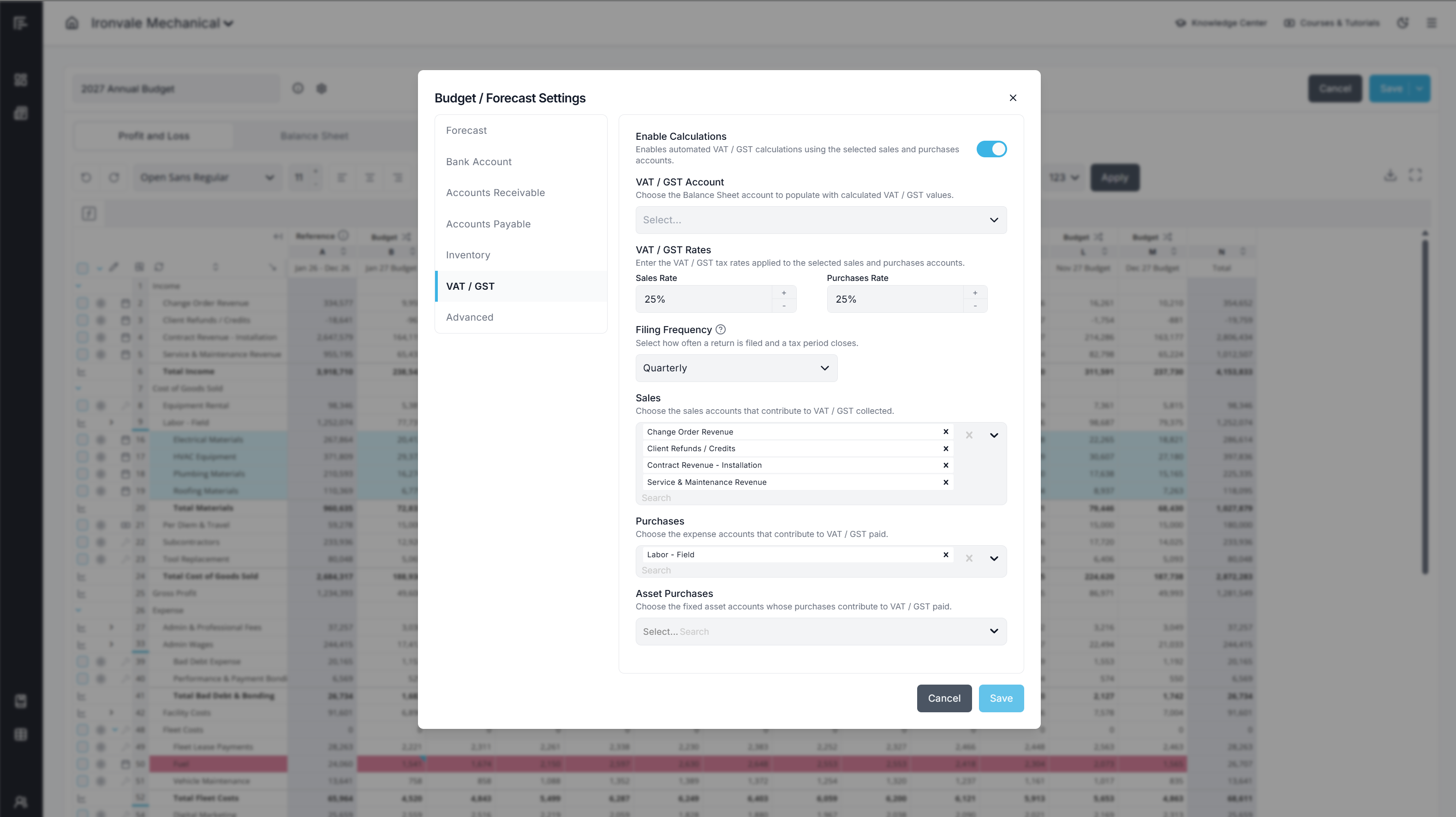
Setup steps
- Click the Settings gear icon at the top of the screen.
- Find the VAT/GST calculation and check Enable Calculations.
- Choose the matching Balance Sheet liability account from your Chart of Accounts.
- Enter your Sales Rate and Purchases Rate — the percentage of tax charged on sales and reclaimed on purchases.
- Choose your Filing Frequency from the available options: every 1, 2, 3, 6, or 12 months.
- Choose the Income and Expense accounts on your P&L that should drive the calculation.
- Optional: to include fixed asset purchases, choose the Fixed Asset account from your Balance Sheet — the account where your equipment is booked.
Payment Lag is fixed at one month in this version, so there's nothing further to set there. Once enabled, the tax row on your Balance Sheet is grayed out and locked — Reach Reporting is calculating it for you. Hover over any cell to see exactly how it split the number into Existing Balance, Monthly Net VAT/GST, New Balance, and Payment.
|
EXISTING BALANCE Carried in from last month, unpaid |
MONTHLY NET VAT/GST This month's own activity |
PAYMENT What's remitted this month, if any |
NEW BALANCE Existing + this month's net - payment |