![Asset 1.png]](https://knowledge.reachreporting.com/hs-fs/hubfs/Asset%201.png?height=22&name=Asset%201.png)
In this article:
- Overview
- How Currency Conversion Works
- Setting Up Currency Conversion in a New Consolidation
- Setting Up Currency Conversion in an Existing Consolidation
- Exchange Rate Assignment
- Verifying Exchange Rates with Data Sheets
- Exchange Rate Source
- Currency Translation Differences (FCTR)
- Limitations
Overview
You can consolidate companies with different currencies and have Reach Reporting automatically handle foreign currency conversion by using historical exchange rates within a consolidated company. For Profit and Loss and Cash Flow Statements, the monthly average exchange rates are used, and for the Balance Sheet, the end-of-month exchange rates are used (in accordance with IFRS and GAAP guidelines).
When you have a consolidated group of companies operating in different currencies, Reach Reporting uses these historical exchange rates to convert all accounts to your selected reporting currency. This allows you to generate unified financial statements and dashboards in a single currency while maintaining accuracy according to accounting standards.
How Currency Conversion Works
Setting Up Currency Conversion in a New Consolidation
To enable currency conversion when creating a new consolidation:
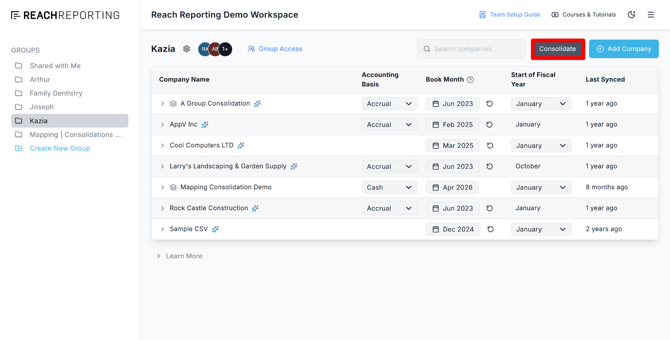
Step 1: Follow the steps for Creating a Consolidation in the Consolidations article.
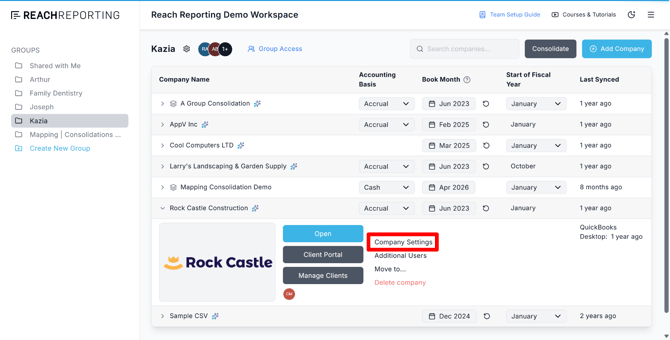
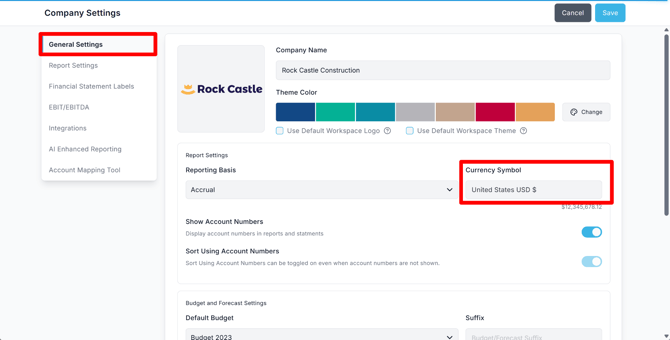
Step 2: The corresponding currencies will be displayed for each company, based on the Currency Symbol in each company’s Company Settings. If any currencies are displayed incorrectly, you can make adjustments in each company’s Company Settings > General Settings > Currency Symbol.
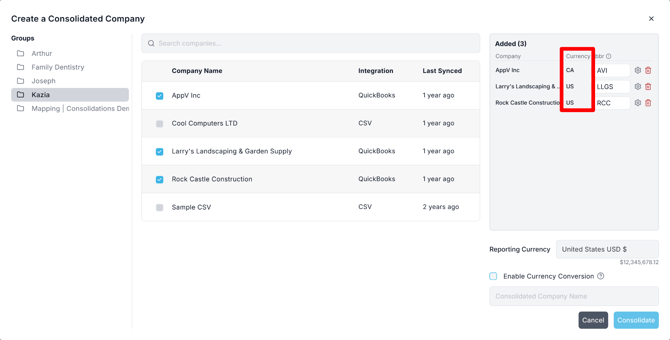
Step 3: Choose your desired reporting currency, then check the box to enable currency conversion.
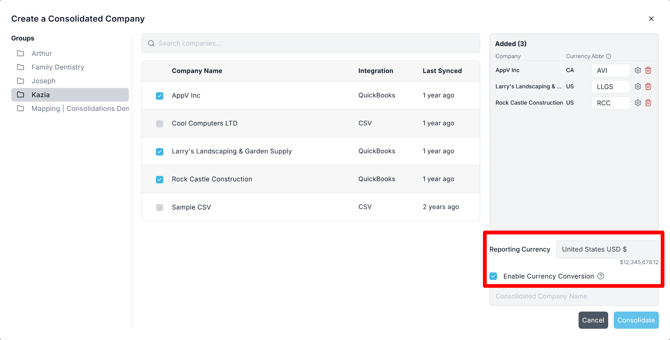
Step 4: Give the consolidated company a name and then click Consolidate to finalize your consolidation.
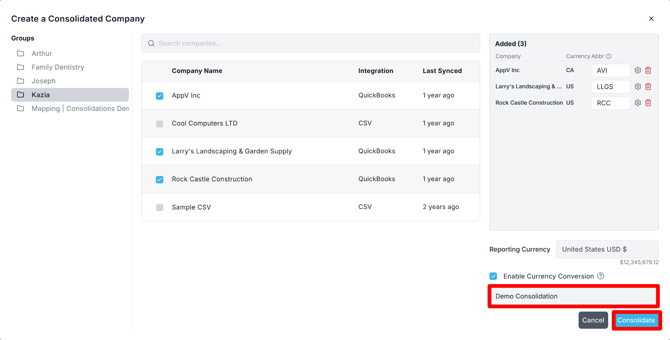
Once created, you can generate reports and dashboards using the common reporting currency.
Setting Up Currency Conversion in an Existing Consolidation
To enable currency conversion in a consolidation that has already been created, click Manage after expanding the consolidated company from your workspace home.
Note: Only the Workspace Owner, Secondary Admin, or the user who initially created the consolidation will have access to the Manage option.
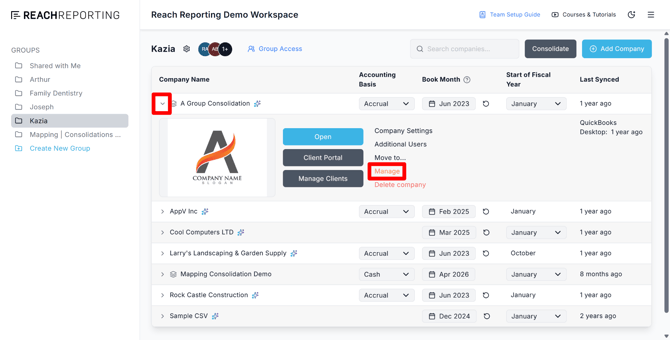
Once you access the Manage menu:
Step 1: Choose your desired reporting currency
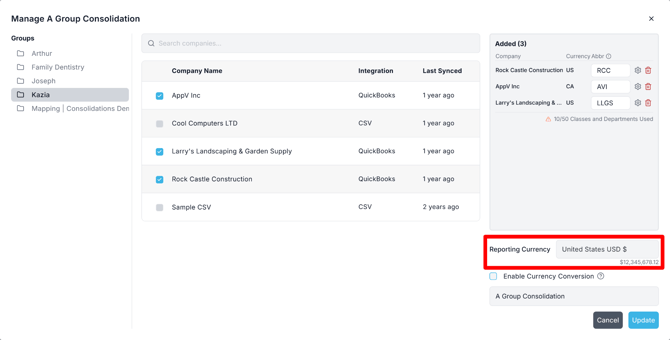
Step 2: Check the box to enable currency conversion
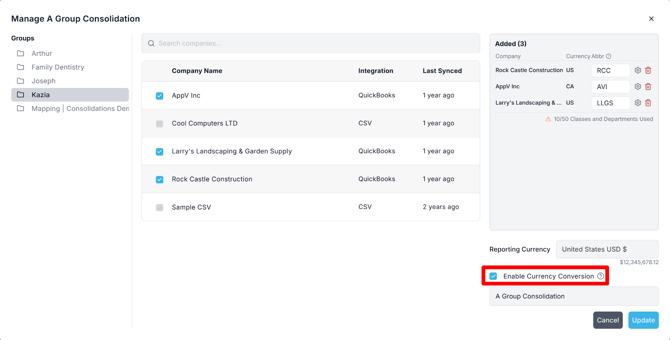 Your consolidation will now convert all financial data to the selected reporting currency using the appropriate historical exchange rates.
Exchange Rate Assignment
Reach Reporting automatically assigns the appropriate exchange rates based on account type:
- Profit and Loss Accounts: Monthly average exchange rates for the given month
- Cash Flow Accounts: Monthly average exchange rates for the given month
- Balance Sheet Accounts: End-of-month exchange rates for the period (in accordance with IFRS and GAAP standards)
Verifying Exchange Rates with Data Sheets
Using Exchange Rates in Data Sheets
You can create a data sheet within your consolidation to pull and display exchange rate information. This is helpful for:
- Verifying the correct rates are being applied
- Creating audit-ready documentation
- Communicating rate assumptions to stakeholders
How to Display Exchange Rates in a Data Sheet
Step 1: Create a new data sheet within your consolidation
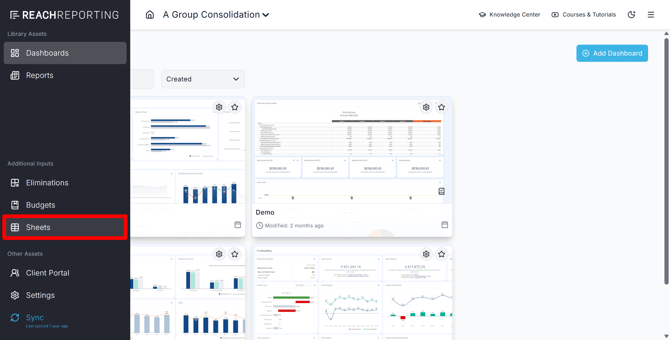
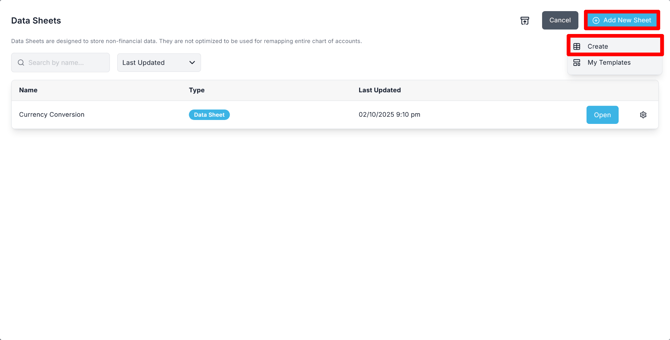
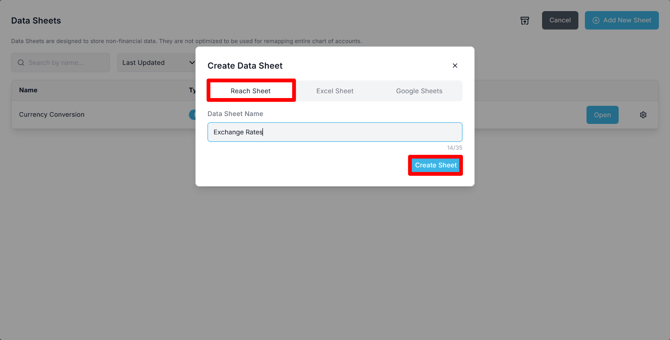
Step 2: In the data sheet, navigate to Add Data/Rows > Data > Other Sources > Exchange Rates
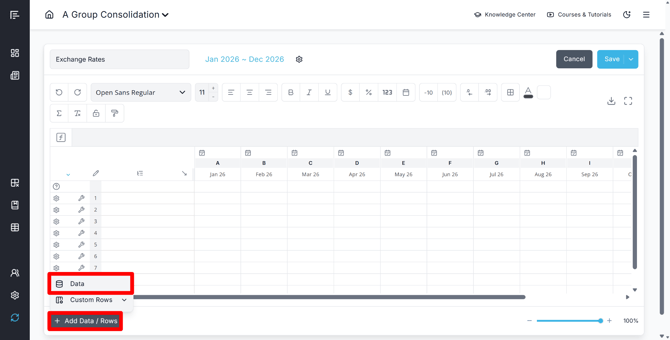
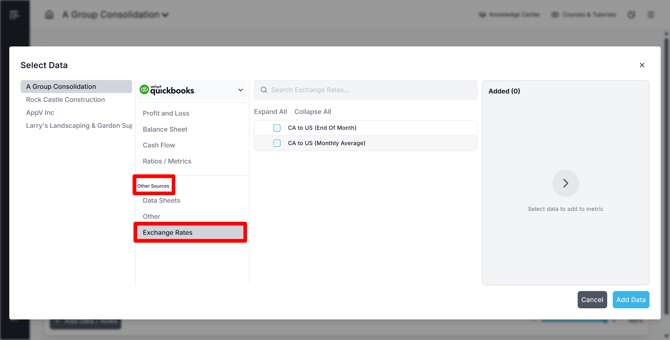
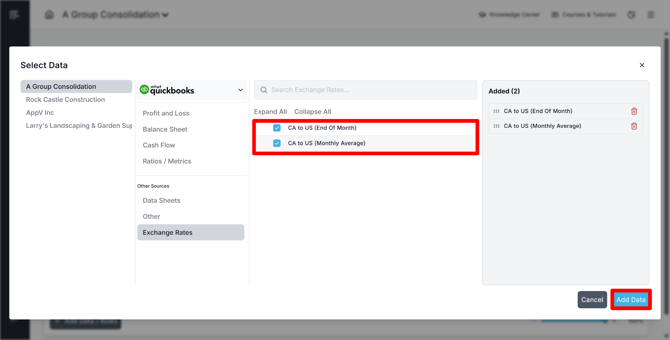
Step 3: Select the exchange rate type(s) you want to display and then click Add Data:
-
End of Month — Exchange rates used for Balance Sheet accounts
-
Monthly Average — Exchange rates used for Profit and Loss and Cash Flow accounts
Step 4: Highlight the rows containing the exchange rate data
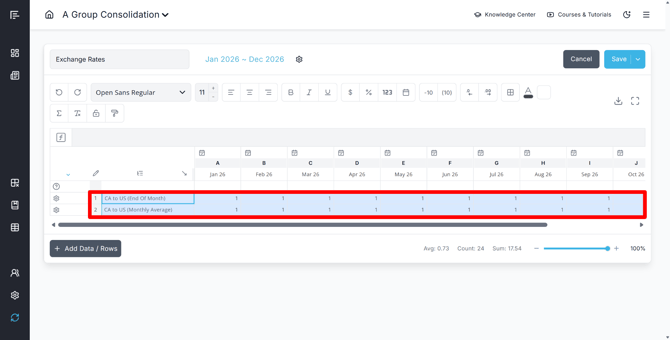
Step 5: Increase the decimal places to view the granularity and precision of the rates being applied
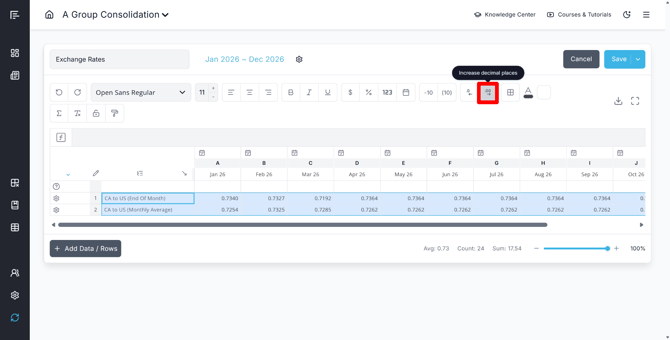
This approach allows you to review, document, and communicate exchange rate assumptions to stakeholders with full transparency.
Exchange Rate Source
Exchange rates are sourced from https://openexchangerates.org/ to ensure accurate and up-to-date currency conversion data.
For budgets and forecasts: Budget numbers for future months will use the most recent known exchange rate value.
Currency Translation Differences (FCTR)
Translating financial statements into the reporting currency using different historical exchange rates leads to currency translation differences on the Balance Sheet (i.e., assets will not equal liabilities plus equity). This is a normal accounting outcome when consolidating in multiple currencies.
Handling FCTR Adjustments
A reconciling figure that takes these translation differences into account should be introduced into your consolidated financials. Foreign Currency Translation Reserves (i.e., currency translation differences) are typically recorded:
- On the Balance Sheet: Under the Equity section
- On the Cash Flow Statement: As a separate line item under "Effects of Currency Translation Differences" (not under Financing Activities)
For more information on accounting standards related to foreign currency translation, see:
- IAS 21 The Effects of Changes in Foreign Exchange Rates (ifrs.org)
- IAS 7 Statement of Cash Flows (ifrs.org)
- 830 Foreign Currency Matters (fasb.org) — search for 830
Current Solution
In the near future, Reach Reporting will automatically handle FCTR adjustments for you. In the meantime, you have two options:
Option 1: Custom Row Calculation
Use a custom row calculation to add the difference between assets and liabilities plus equity on both the Balance Sheet and Cash Flow Statement
Option 2: Separate Entity
Book currency translation differences in a separate entity and then consolidate it with your other companies
If you need to eliminate certain accounts that have FCTR adjustments, you can do so by choosing them from the entity where adjustments are booked and leaving the offsetting accounts in the other consolidated companies unselected. This helps properly convert your companies into the reporting/presentation currency. See Eliminations in a Consolidation for more information on how to add eliminations.
Limitations
Currency conversion is not available for CSV or MYOB consolidations. This feature is only available for consolidations using data from the following integrations:
- QuickBooks Online
- QuickBooks Desktop
- Xero
If you need currency conversion capabilities, ensure your consolidated companies are connected through one of these supported integrations.
Go to the Reach Reporting app>
ARE YOU NOT CURRENTLY USING REACH REPORTING?
learn more at reachreporting.com
We are dedicated to helping you.
- Need Additional Help?
Your success is important to us.
Whether you're working as a CFO of a business or part of an accounting firm, Reach Reporting is here to improve your working knowledge of reporting and provide service tips and skills to ensure you're at the top of your game.
We make sure that you have access to staff members who are best suited to help you. We work together to resolve issues and create memorable moments that empower you to enhance your reporting skills.
We are here to listen to you. We understand that using new technology can be frustrating, so we can answer questions or jump on a quick Zoom call. Our entire staff has an in-depth knowledge of Reach Reporting and can quickly direct you to best practices to improve your reporting.
We are focused on providing solutions that save you time and increase your value. We continue to improve each day and look forward to visiting with you. Your communication with us is vital and appreciated.
Please feel free to chat with us by clicking the help chat bubble in the lower right-hand corner of this page.
Reach out to your Reach Reporting Rep and schedule a Zoom meeting by clicking the meeting link in their email signature.
Or schedule to join our ongoing webinars.
Reach Reporting is dedicated to helping provide a knowledge base that is easy to understand and informative. If you still have questions that have not been answered, please let us know by emailing support@reachreporting.com, chatting with our support team, or calling us at (877) 467-7637. We are here to ensure that you have a positive experience with Reach Reporting, as we want to continue to be the reporting solution you trust.
Need more access to Reach Reporting Resources?
Reach Reporting has a wealth of knowledge and a robust online community to support you as you create reports that provide powerful insight. Please look into the following resources.
Reach Reporting Blog: We add blogs to our site every month to give you great information in a fun and friendly manner.
Case Studies: We interview one company per month to help our clients highlight how they are using Reach Reporting and how it is improving their services and firm offerings. These case studies are invaluable to our community.
Knowledge Center: From simple to complicated, we provide step-by-step guidance to utilize every aspect of Reach Reporting in our robust knowledge center.
Video Tutorials: We know watching is sometimes easier than reading, which is why all of our tutorials are video-based in the video tutorial section of Reach Reporting and Youtube.
Social Networks: Join us on FaceBook, LinkedIn, Youtube, and Twitter.
Monthly Newsletter: Go to the footer of reachreporting.com and sign up to receive the Reach Reporting newsletters delivered directly to your inbox. Our newsletters cover tips and tricks, current events in accounting, strategies to improve your advisory services, and much more.
We look forward to helping you build insightful reports,
The Reach Reporting Team.